Release July 2025 (before the summer break)

We are happy to deliver the brandnew July 2025 Release with the new New Dynamic List Queries and many other Features! Try it now!

Remember, the Frontend is the user friendly spreadsheet for your Collector Users to deliver their monthly/weekly/daily data. The Admin Center is the tool for the Power User to setup and control your organization’s collection workflows.

(1) Frontend: New Dynamic List Queries (Preview)

List Queries have become a powerful feature and are essential for many advanced applications in data1.io. Until now it was necessary to define a maximum number of rows or columns which could be filled by the list query and then fade out the rows / columns not used.

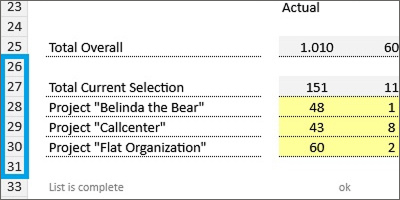
We are very happy to present the new dynamic List Queries which generate automatically the needed number of rows or columns. Have a look on this top level query – there are no additional (hidden) rows:

But have a look on this team level query – there are also no additional (hidden) rows:

For a dynamic List Query only one row (or column) is defined which will be duplicated as often as there are hits in the list query. You need two additional parameters for the list query to make it dynamic:

  • data1_LISTQUERYxx_T_DIMxxx_CmdDynamic
    1 = dynamic list query
    The named range for the List Query is dynamically reduced or expanded by rows or columns. The first row or column is copied (copy/paste) to the new row(s)/column(s) so that the formulas and conditional formatting are retained and automatically adjusted to the new row/column (behaviour as in MS Excel).

    0 = static list query = default
    The named range is filled to the stop, rows/columns beyond this are not created.

  • data1_LISTQUERYxx_T_DIMxxx_CmdExpansion
    row = new data is added row by row = default
    column = new data is added column by column

Dynamic List Queries are a complex feature with many interactions with other features:

  • Clean removal of the existing rows from the last list query
  • Clean format for the generated rows/columns and clean application of the changed cell format
  • Sheet Protection
  • Row Level Security (RLS)

This complexity is the reason why dynamic List Queries are currently in preview.

(2) Frontend: Writeback Optimiziation for List Queries

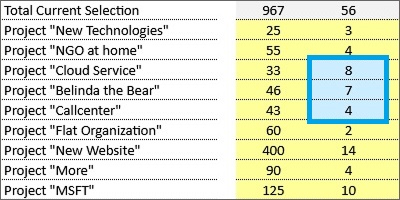
We have introduced the writeback functionality for List Queries in March 2025 Release. We`ve learned that the writeback in large lists was very slow since for every entry in the SysDelta parameter a separate SQL statement was sent in order to replace the already existing records for this batch.

With this release, the deletion of the existing records is executed with only one single SQL statement …

… which makes the writeback process performant:

(3) Frontend: Dimension Tree Sorting

The order of the sum level nodes in the dimension tree is determined …

… by the assigned elements with the lowest SORT information:

Until now, this algorithm used only the visible elements of a (filtered) dimension tree. Therefore the following constellation …

… led to a dimension tree with reversed order of the the two companies on Level 2. With this release we have changed this algorithm and the order of the sum level nodes results from all existing elements – visible or not:

This is a major change, since the dimension tree in an application has now always exactly the same order in all filtered variations of the tree.

(4) Admin Center: Dependent Filters in Tables

We have introduced the new column filter experience in November 2024 release. With this release we are happy to introduce dependent filters. That means that existing filters on one column …

… reduce the number of hits in all other column filters:

(5) Admin Center: RLS Improvements

We have learned that the RLS definition can be difficult due to the default column names in the RLS dialog. With this release we have added the individual column names to the dialog which will make it easier to see which attributes e.g. belong to the same hierarchy:

(6) Admin Center: Copy Data Improvements

We are happy that it is now possible to change the sort order of the filters in the “Filter condition(s)” block as well as in the “Target rule(s)” block:

Furthermore, we have also optimized the column order in the “Filter Condition(s)” block:

Last but not least, we have added the date to the timestamp in the execution bar.

(7) Further Improvements

We have solved an timing issue with the “Read Validation” (which was initially released in February 2025 release). In rare cases the validation message was shown altough there was no issue since the validation message was shown earlier than the READ process for the sheet was finished.

There was an issue in the Copy Data feature. The number of records shown which will be replaced (as preview before you start the copy data job) was not correct in some cases.

We have found a solution for the limitation for the execution of SQL statements with more than 2100 parameters – SQL statements are now executed piece by piece with 2000 parameters maximum.

We have also solved issues in the Admin Center in the Collector Users and in the RLS definition screens.


We hope you like the new features – we are very curious about your feedback!

Please let us know what you think about data1.io and what kind of planning and data collection processes you evaluate to automate.

We`ll be back after the summer break with the September Release!

we #StandWithUkraine
Release June 2025

We are happy to deliver the brandnew June 2025 Release with the new Admin Center UI and new Copy Data Features! Try it now!

Remember, the Frontend is the user friendly spreadsheet for your Collector Users to deliver their monthly/weekly/daily data. The Admin Center is the tool for the Power User to setup and control your organization’s collection workflows.

(1) Admin Center: New User Interface

We are very happy, to deliver a major update for the user interface of our Admin Center!

a. New Menu Format

We renewed the menu format by

  • adding symbols to the menu items
  • removing the enumeration of the major menu items
  • removing the vertical line on the second level of the menu
  • removing the hamburger icon on the top
  • moving the tenant information into the header

Compare the new menu format and page layout …

… with the old format and layout:

A major goal of these changes was also to replace the previous folded slim menu (which was titled “Navigation Pane” and was only a placeholder) …

… by a fully functionable slim scale menu based on the images (which is of course already a standard for many SaaS solutions):

b. New Landing Page

Since we removed the enumerations from the major menu items on the left, we thought it would be a good idea to replace also our old landing page which carried only very little information (i.e. a list of the available applications) …

… with a new info page, which is hopefully helpful to get a good orientation about the content of the menu structure on the left:

c. New Loading Behaviour

Another major change is a new loading behaviour for the sub-content of the selected menu item.

Until now, the whole content from the horicontal sub-navigation was loaded initially when selecting a menu item – which could take a quite long time.

From now on, only the content of the first menu item – which is currently the “Info” page – is loaded when selecting a menu item and is therefore very fast. When selecting another item from the horicontal sub-navigation, it will be loaded and you have to wait only for the selected content. This will save most of you a lot of time since usually we do not enter all the items from the horicontal sub-navigation.

d. New Mobile Layout

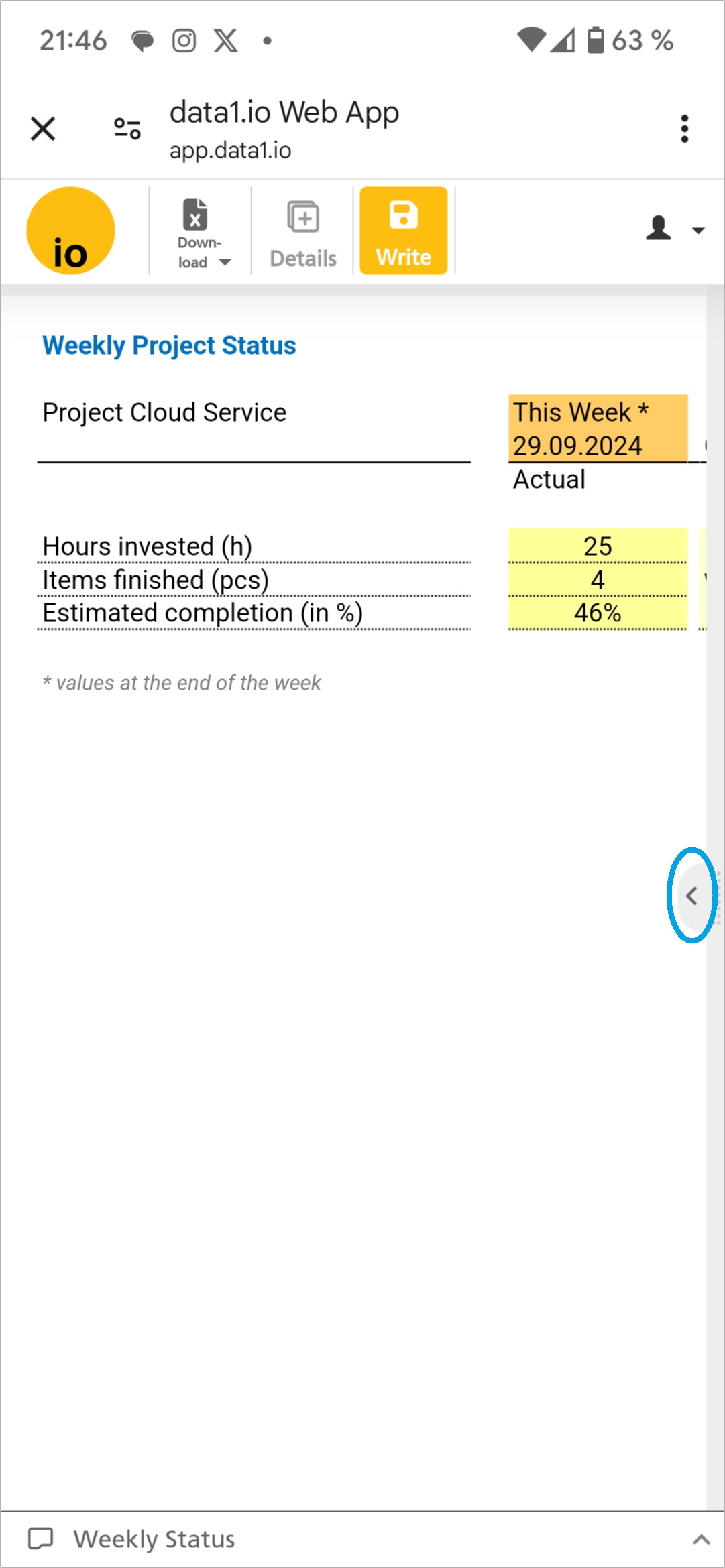
We are very happy, that with the new menu format we could reach a major improvement for the mobile view of the Admin Center! In portrait view, the slim navigation on the left makes it quite realistic to use also the mobile to change some settings within the Admin Center …

… while in landscape view the navigation can be expanded:

(2) Admin Center: New Copy Data Features

With the April 2025 Release we have delivered a major update for the Copy Data Feature, with the May 2025 Release we delivered another important improvement and with this release we deliver 2 more major features!

Please be aware that this feature is an Add-On which needs to be licensed seperately.

a. New Groups

The more features we deliver, the more Copy Data jobs will be defined. This made it necessary to add a new group level in order to bundle jobs which belong to the same logical process and usually should be executed in one batch.

If you enter the Copy Data definition you will see now a new group level called “Non-grouped copy data definitions”:

Sure, you can define now a new group …

… and move your existing jobs to the new group:

With the new “Execute all” button on the group level you can start all jobs in one batch:

The preview for the replacement of the existing records is now expanded to all included jobs:

The jobs are executed sequentially in the order of appearance:

b. New @ Parameter

Another big feature is the possibility to use now @ parameters for your target rules in order to define the result of a copy data job with a formula!

Think on the SYSTEM.Delta field:

In many cases you`ll need to fill this field dynamically in order to create a new forecast / planning version which can be edited after creating the base values with copy data jobs.

If you use an @ parameter, the Validate target value formula button will appear and deliver da preview of your formula:

Here is the compact information about the usage @ parameters:

Usable with every field in the target rules area

You can reference on all fields from the fact table and on all related attribute fields from the 10 dimension tables. Use the SQL name of the field as @ parameter, you’ll find them in the “Develop your Datamodel” section:

(3) Admin Center: Leading Zeros during Download

Until now, leading zeros from dimension keys where removed in the Excel download file. With this release, the download of data1.io tables into Excel files is executed on the basis of the field definition in the data1.io database. Therefore, leading zeros from dimension keys …

… will not be removed anymore, since dimension key fields are defined as alphanumeric fields in the database:

(4) Admin Center: Improvements for Parallel Hierarchies

We have released parallel Periods in our last May 2025 Release, this month we have two improvements.

First, you can change now the name of the Hierarchy Key, which is not a key anymore but only a display name (until now this was not a good idea since the relationship to the hierarchy levels was last after renaming the key):

Second, only one hierarchy can be the default hierarchy:

(5) Admin Center: Billing Infos

We have worked on automatization of our billing, visibly there are 2 new fields int he Capacity Changelog which shows you, which rows were already billed and which ones are open:

Please be aware that at this time there are no financial information from the bill are shown here.

(6) Further Improvements

The definition of the named range data1_CELLS0x_DIM001_Alternative did not work, if it contained only of 1 cell – this works now.

We have improved the message, if a Dim001 Key is not found on writeback in conjunction with active Row Level Security (RLS).

There was an issue with the browser message “Page does not respond” due to repeated attribute queries – this could be solved.

We have solved an issue with copy & paste on protected cells, another issue with the writeback of empty data entry sheets and an issue with “Drillthrough Documents” which are not allocated to any workflow.

Finally we could solve an issue with truncated dropdown lists.


We hope you like the new features – we are very curious about your feedback!

Please let us know what you think about data1.io and what kind of planning and data collection processes you evaluate to automate.

we #StandWithUkraine

Release May 2025

We are happy to deliver the brandnew May 2025 Release with the new Parallel Hierarchies and the new Sum-Level Trees! Try it now!

Remember, the Frontend is the user friendly spreadsheet for your Collector Users to deliver their monthly/weekly/daily data. The Admin Center is the tool for the Power User to setup and control your organization’s collection workflows.

(1) Frontend: New Parallel Hierarchies

We are very happy to provide this new feature which enables a lot of new applications.

a. Field of application

Basically, with parallel hierarchies the elements of the dimension tree can be grouped in alternative structures:

b. New Hierarchy Definition

At first, you decide which attributes from the dimension table will be used for a parallel hierarchy. Then you can rename those fields in the “Datamodel” and upload the new dimension table:

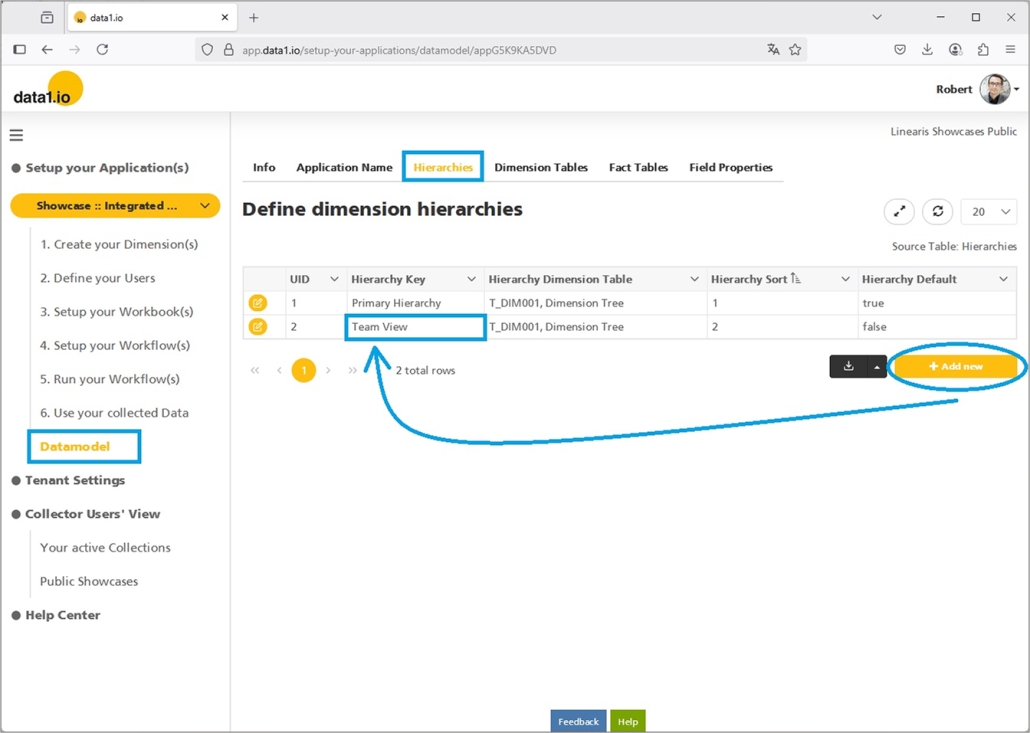
Next, you create the parallel hierarchy in your datamodel and name it properly:

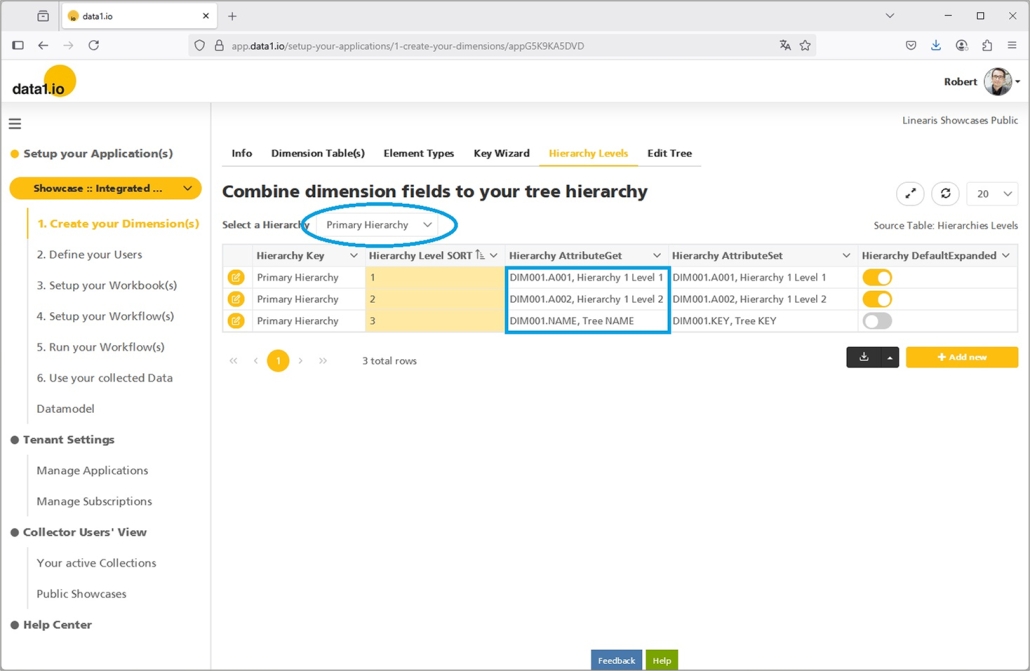
Then you define, which attributes from the dimension table belong to the new hierarchy:

That`s all!

c. Extended Row Level Security (RLS)

We have extended also the dialog for the Row Level Security (RLS) for parallel hierarchies.

Please be aware that the RLS from one hierarchy is NOT applicable to a parallel hierarchy (although the same bottom elements are involved) – if RLS is relevant also for the parallel hierarchy, then it has to be defined separately.

Please be also aware that at the moment, only the first 10 attributes from the dimension table can be used for RLS definitions (and the default names are shown in the dialog).

d. New Workbook Parameter

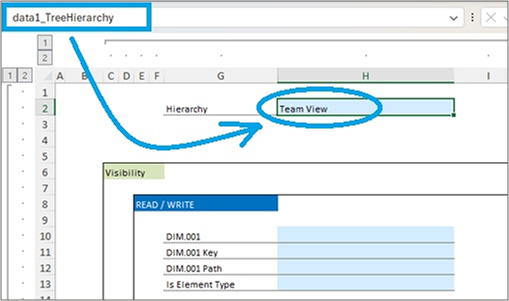
Finally we have created a new workbook parameter in order to define which hierarchy from the dimension tree should be used in certain sheet of the workbook:

  • data1_TreeHierarchy

Of course, this parameter is optionally. If not defined, the “Default Hierarchy” from the hierarchy definition will be applied.

(2) Frontend: New Aggregated Hierarchies

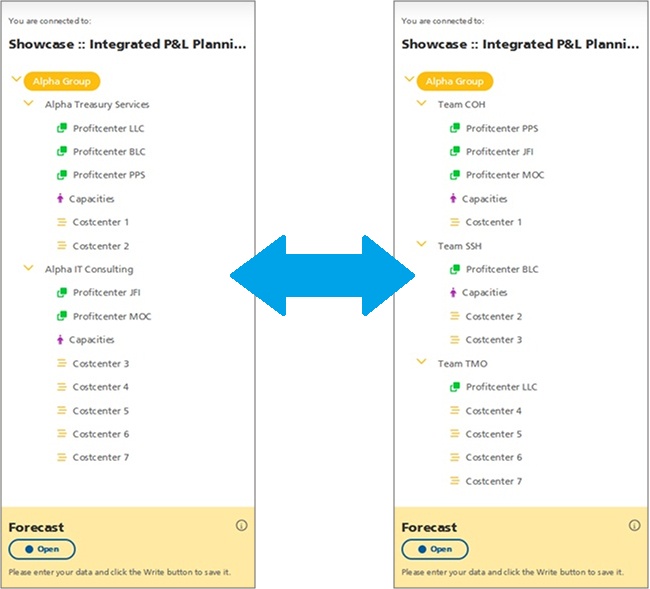
You can use the new parallel hierarchies also for another field of application. Instead of showing a fully detailled dimension tree e.g. in reports and landing pages …

… which is based on a definition like this (including the “Tree NAME” on the bottom level) …

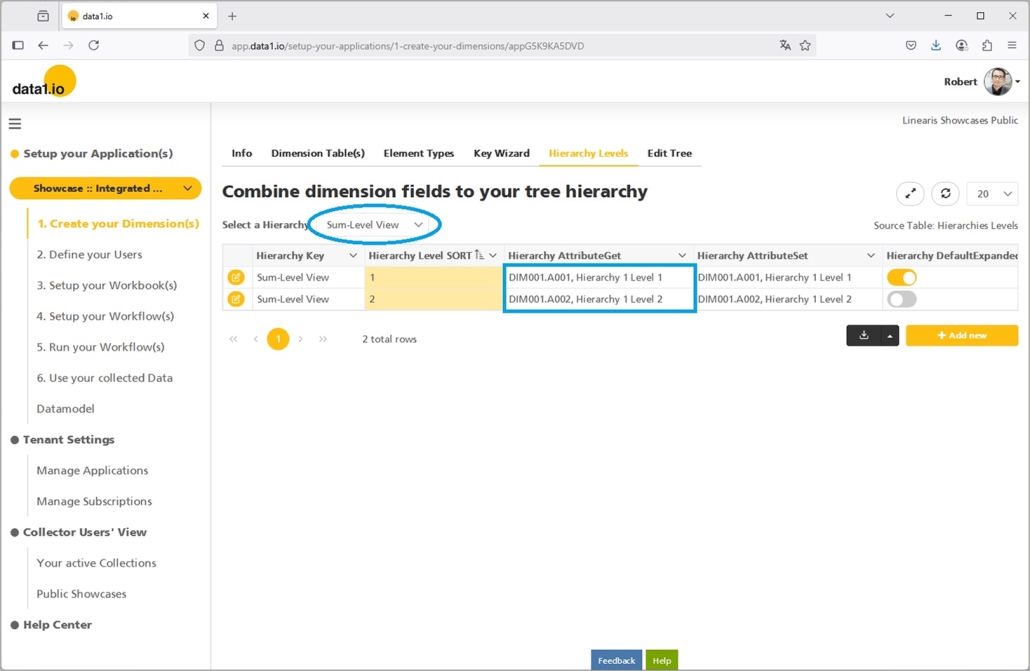
… you can define a separate hierarchy …

… which uses the same attributes but leaves the “Tree NAME” on the bottom level:

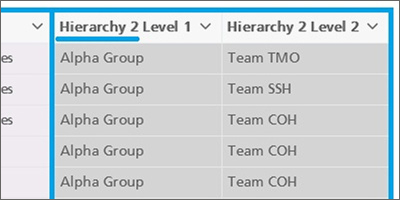
This leads to an aggregated “sum-level” tree which can be more effective especially in reports:

(3) Admin Center: New User Profile Image

From now on, the user profile image will be shown in all tables from the Admin Center …

… this makes it easier for you to recognize your collector users on the first view. 🙂

(4) Admin Center: Table Improvements

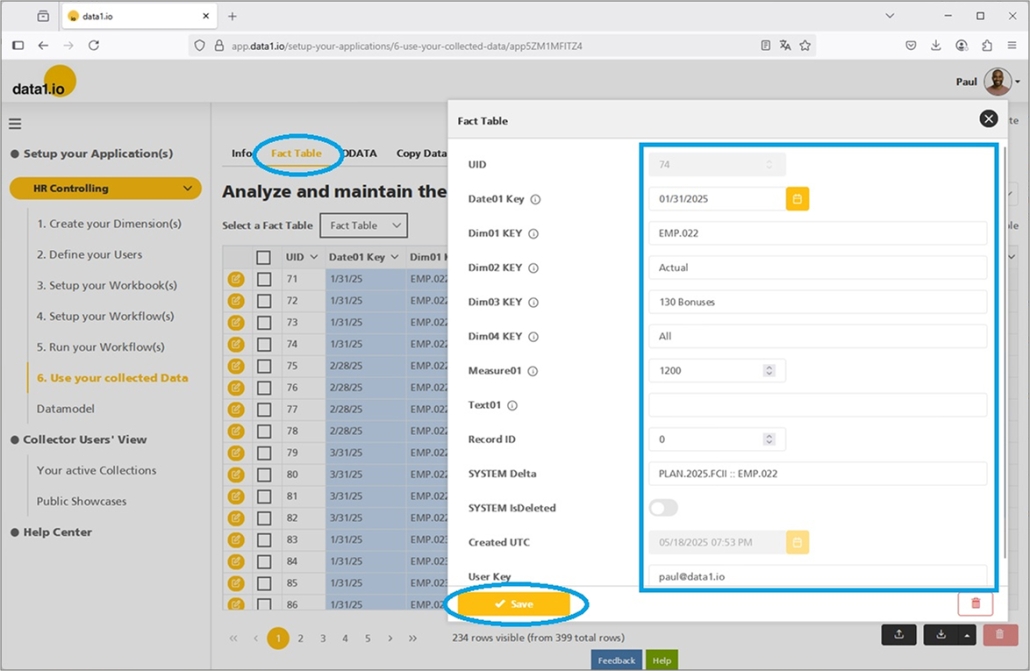
a. Editable Fact Table

We have removed the read-only restriction for the fact table. So from now on the records from the fact table can be edited – this makes it easier to correct individual errors:

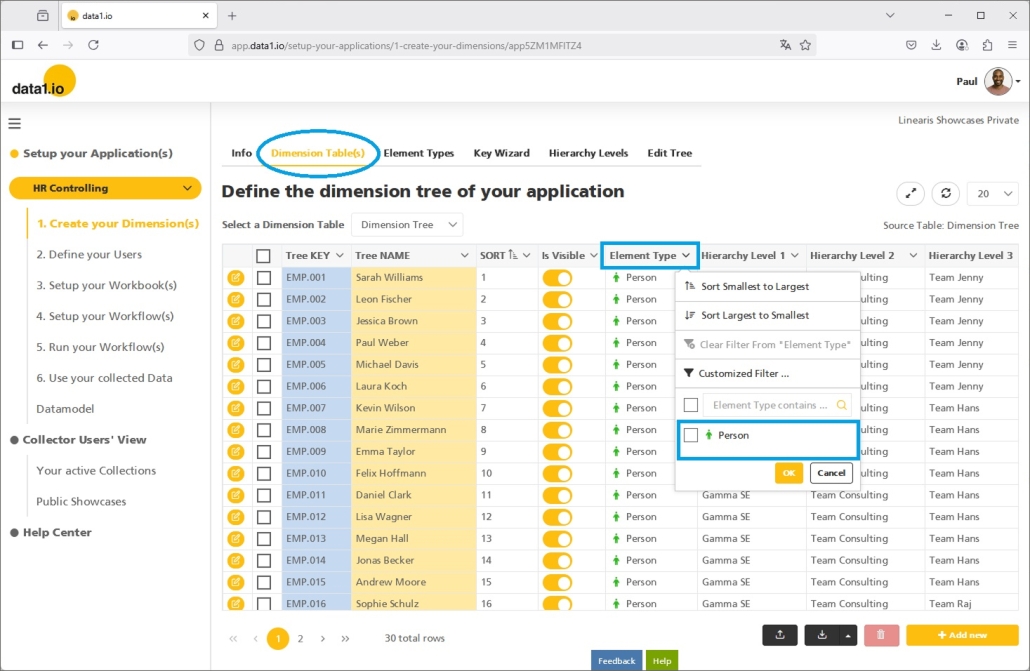
b. Improved Element Type Display

We have improved the display of the element type in the dimension table (column width) and also the content of the dropdown filter (symbols instead of html code and no “default” element anymore):

(5) Admin Center: Copy Data Improvements (Add-on)

Also this month we have improved the Copy Data feature. From now on you can define not only “is equal to” but also “is not equal to” filter conditions:

Copy Data works now also with applications with “Always Encrypted” on – this was a quite big issue to solve.

Last but not least, the execution of a Copy Data job in the Admin Center is not shown any more also in the Frontend.

(6) Further Improvements

    Now it is possible to wrap the names of the columns in an upload file in square brackets [], those brackets will be ignored and the files are uploaded the same as without square brackets.

    Furthermore we have solved an issue with the creation of new applications.


    We hope you like the new features – we are very curious about your feedback!

    Please let us know what you think about data1.io and what kind of planning and data collection processes you evaluate to automate.

    we #StandWithUkraine

    Release April 2025

    We are happy to deliver the brandnew April 2025 Release with the new Workflow Status functions and the new Capacity Management! Try it now!

    Remember, the Frontend is the user friendly spreadsheet for your Collector Users to deliver their monthly/weekly/daily data. The Admin Center is the tool for the Power User to setup and control your organization’s collection workflows.

    (1) Admin Center: New Workflow Status functions

    a. New Workflow Status change

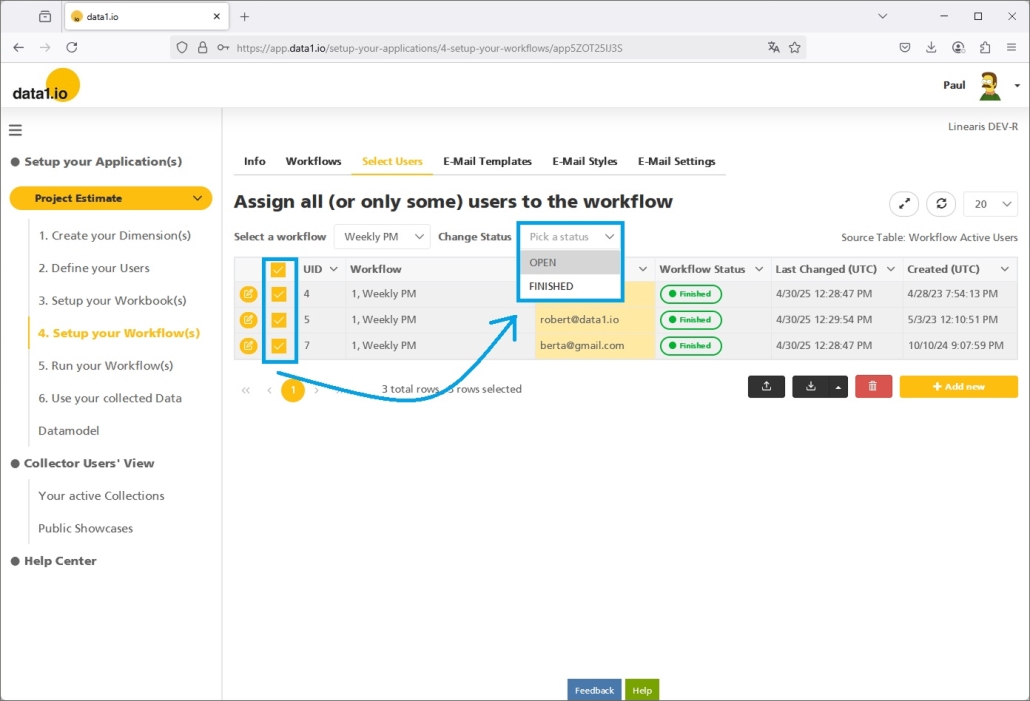
    We are very happy that with this release the Workflow Status of some ore all users that are allocated to a collection workflow can be changed with only 2 clicks:

    • Select the relevant users
    • Change the workflow status by selecting the status from the new dropdown

    Simply acknowledge the dialog …

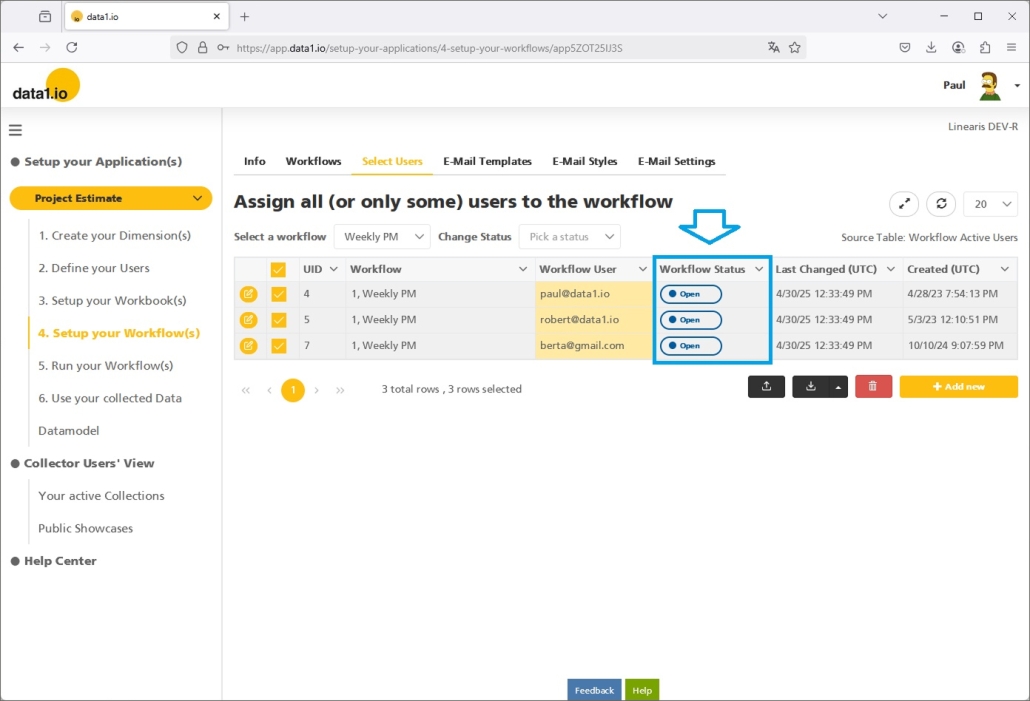
    … and the status of all selected users will be changed at once:

    b. New streamlined Workflow Status symbols

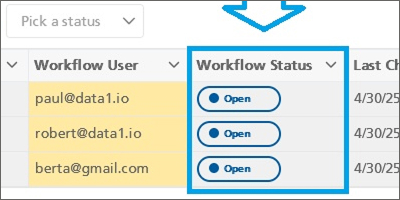
    Furthermore, we have streamlined the Workflow Status symbols all over the application. Beginning in the Admin Center (see screenshot above) over the Workflow Landing Page …

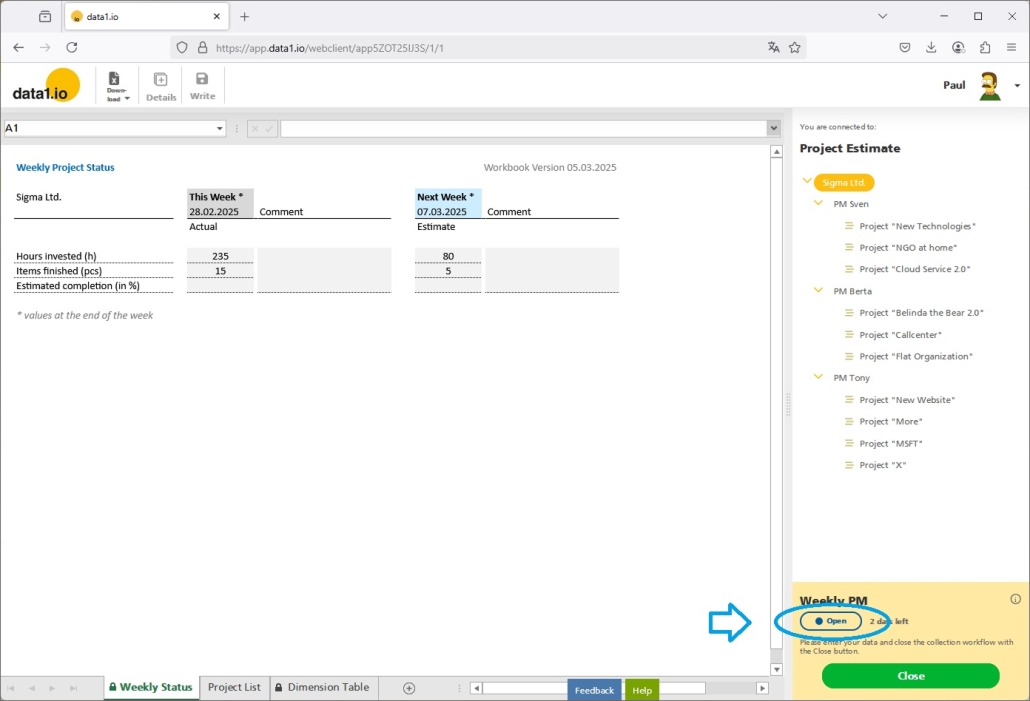
    … and also in the Collector Users frontend, the symbols for the Workflow Status are now everywhere the same:

    Just for your information, at this time 4 Workflow Status exist:

    • Open (blue)
    • Finished (green)
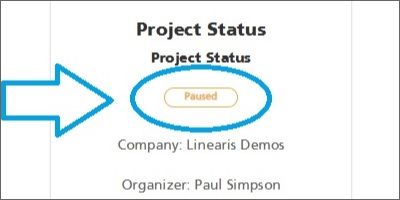
    • Paused (orange)
    • Waiting (grey)

    (2) Admin Center: New Copy Data functions

    We have done a lot on the “Copy Data” feature with this release. Please be aware that this feature is an Add-On which needs to be licensed seperately.

    a. Copy Data – New “Execute” button in the Admin Center

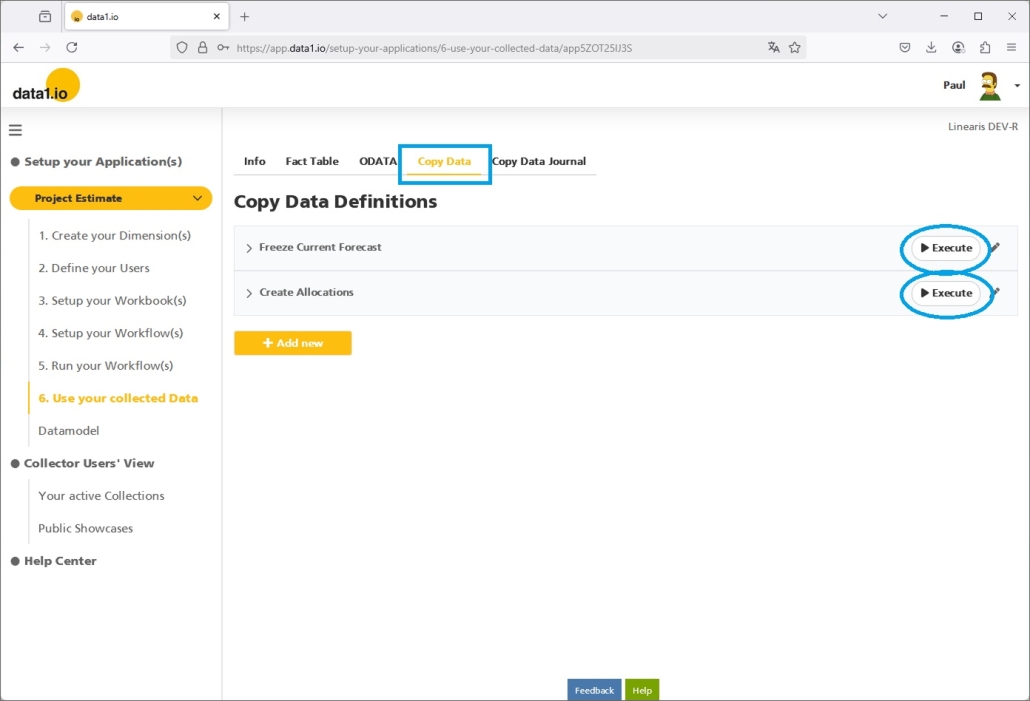
    Due to historical reasons, the Copy Data feature was only accessable via the Frontend but not from the backend. With this release we have changed that and we have added the new “Execute” button directly to the Copy Data job definitions:

    Pressing this button will directly open the Copy Data Job definition (where editable parameters cann be edited) and where the Copy Data process can be started with the “Start” button:

    b. Copy Data – Clean execution as “long running task”

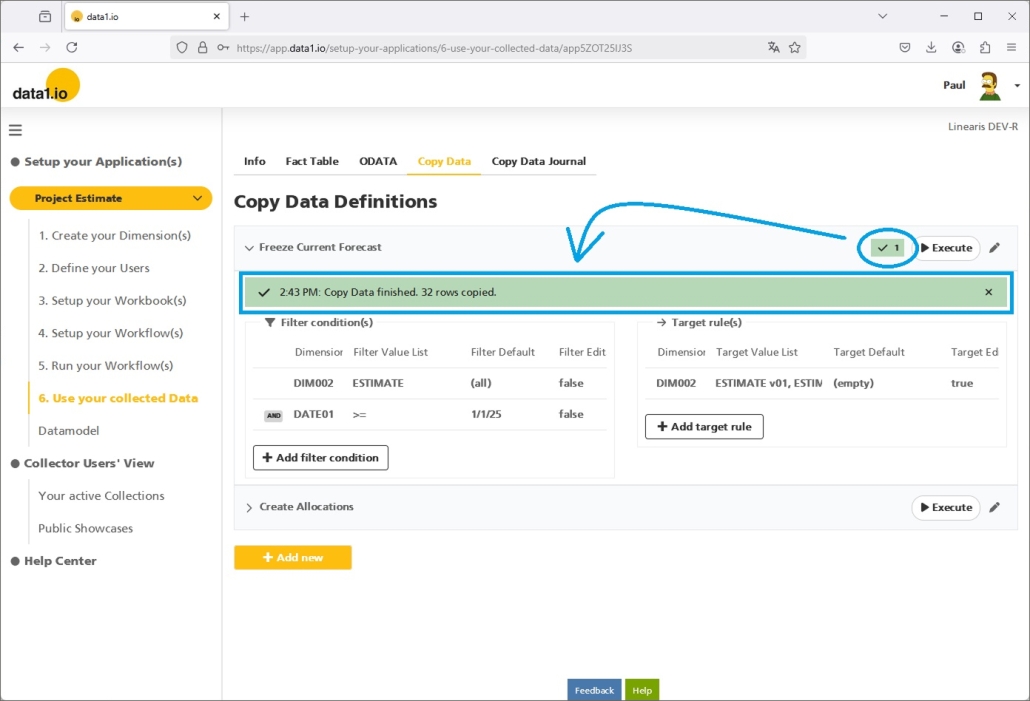
    We are happy, that Copy Data jobs are executed now as so-called “long running tasks”. This prevents you and us from timeout problems with larger jobs. You can see the “in progress” symbol on the Copy Data definition bar as long as the job is running …

    … and you will see the “finished” symbol when it is finished. Furthermore you get now the information how many records were created at which time directly on the task bar within the Copy Data definition dialog:

    c. Copy Data – Improved user interface

    We have improved the user interface for the Copy Data definition.

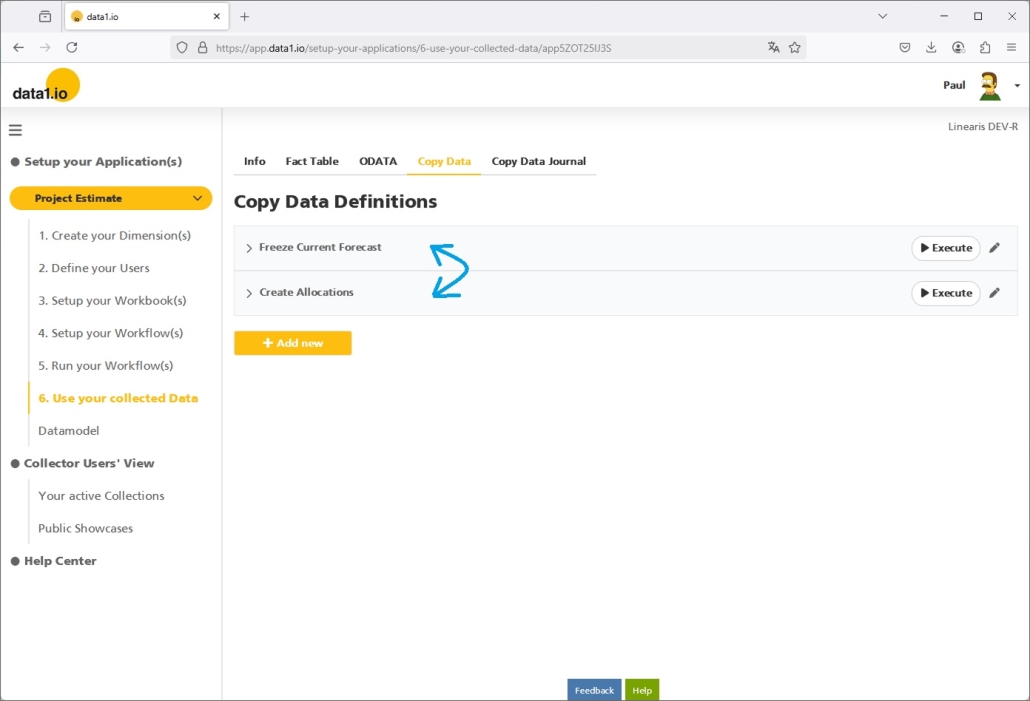
    First, the order of the Copy Data jobs can be changed now by drag and drop. This is very important for larger “Copy Data” processes since jobs often have to executed in a certain order.

    Second, the “is Editable” attribute has now the consequence that the “Filter value default” field is only visible as long as this option is activated:

    d. Copy Data – Extended definitions

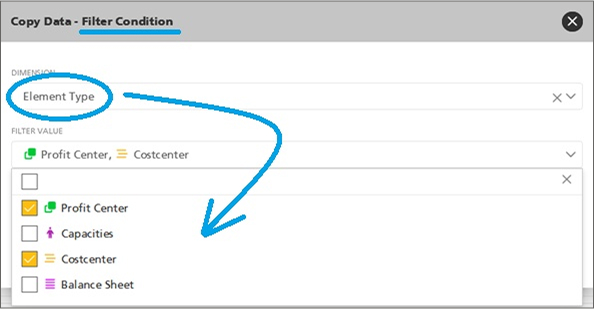
    Filters can be defined now also on the Element Type (from the connected Dim001 Table):

    Furthermore, you can define now Target Rules also on the TEXTxx Attributes in your fact table and you can define now also the value “(empty)” (which is “null” in SQL) in order to remove e.g. the comments from your source records when you copy them:

    e. Copy Data – Increase in price for the Add-On

    Due to those major investments we have increased the price from € 20 per month and application to € 30 per month and application. Like always in data1.io, price increases are not applied to customers who already have this license but only to new licenses.

    (3) Frontend: Two Add-Ons are core functions now

    a. “Iterate Sheet” is a core function now

    We have introduced the “Iterate Sheet” function back in January 2023 release and have improved this feature in many of the following releases. Until now this feature could only be used with an extra “Add-On” License. We are happy that with this release the “Iterate Sheet” function is a core function and can be used with every Free Plan or Enterprise Plan.

    b. “Calculation Wizard” is a core function now

    We have introduced the “Calculation Wizard” back in July 2023 release. Until now this feature could only be used with an extra “Add-On” License. We are happy that with this release the “Calculation Wizard” is a core function and can be used with every Free Plan or Enterprise Plan.

    (4) Admin Center: Enterprise Plan menu items

    Until now, menu items related with an Enterprise Plan and/or an Add-On license were only visible for Tenant Admins but not for Application Owners. With this release we have changed that and now also Application Owners can use all the advanced menu items in the Admin Center:

    (5) Further Improvements

    (will be described soon)

    We have updated the “Create Account” screen and we have improved the “Onboarding” messages. Furthermore we have solved some bugs with the Copy Data feature, with the conditional formatting in the workbook, with the format of the widget on the collection workflows landing page and with the List Queries.


    We hope you like the new features – we are very curious about your feedback!

    Please let us know what you think about data1.io and what kind of planning and data collection processes you evaluate to automate.

    we #StandWithUkraine

    Release March 2025

    We are happy to deliver the brandnew March 2025 Release with the new Writeback in List Queries and the new Capacity Management! Try it now!

    Remember, the Frontend is the user friendly spreadsheet for your Collector Users to deliver their monthly/weekly/daily data. The Admin Center is the tool for the Power User to setup and control your organization’s collection workflows.

    (1) Showcase: New Data Entry in List Queries

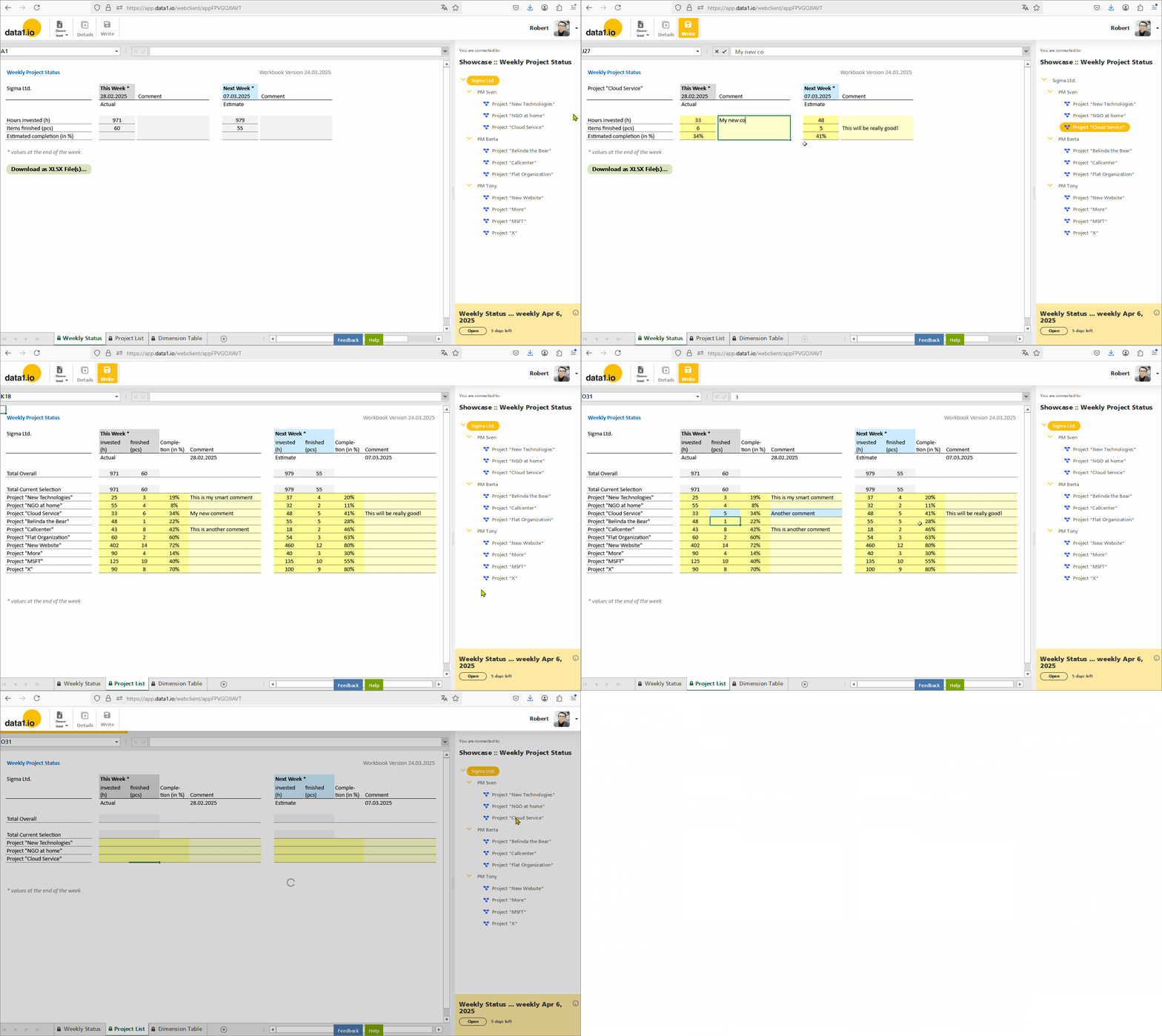
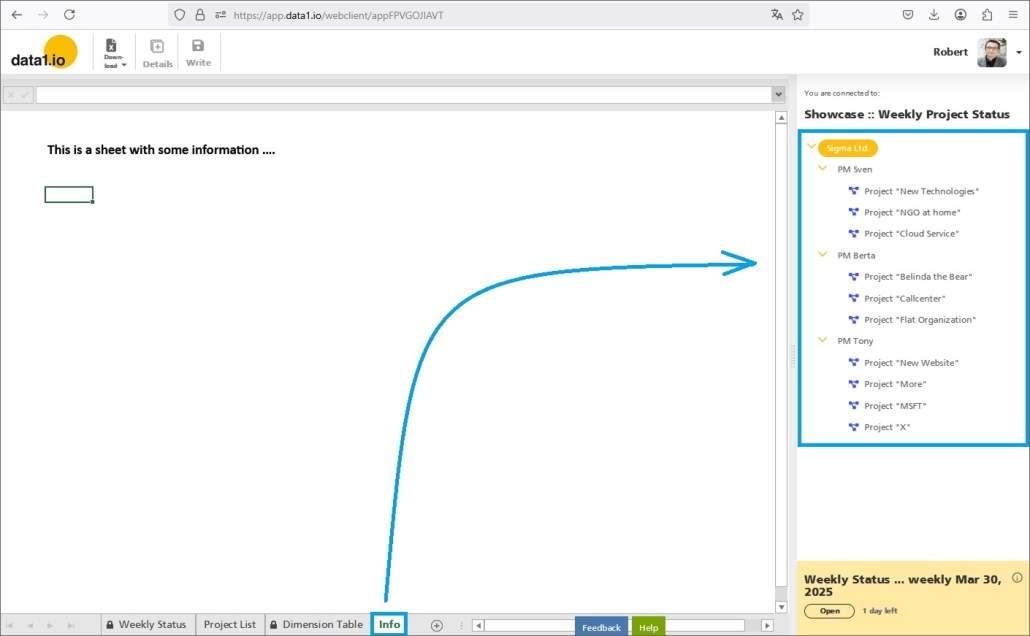
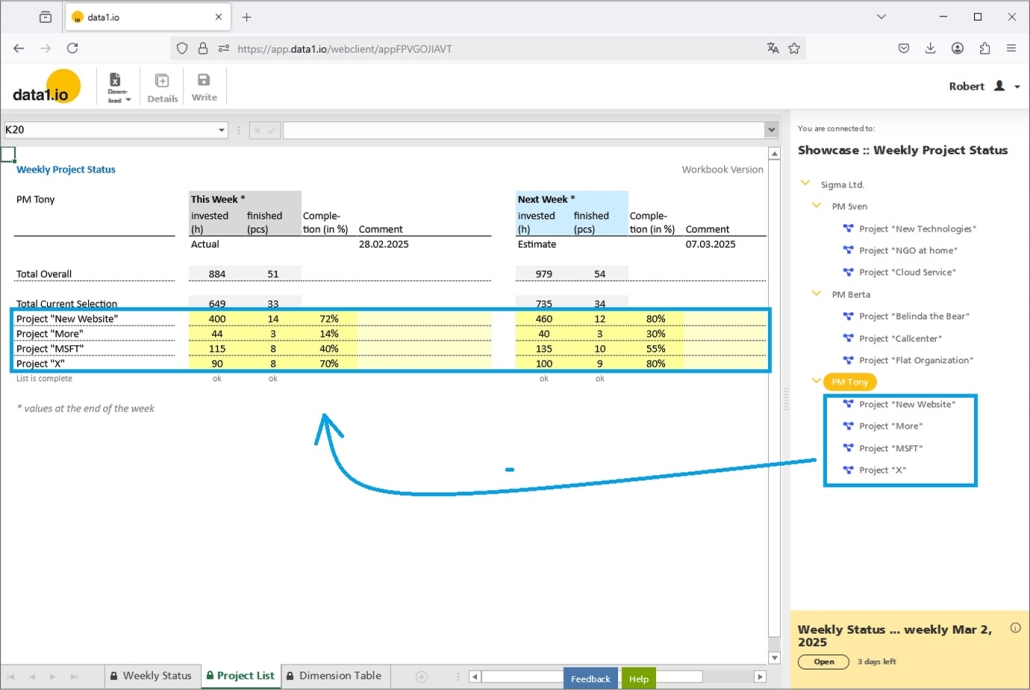
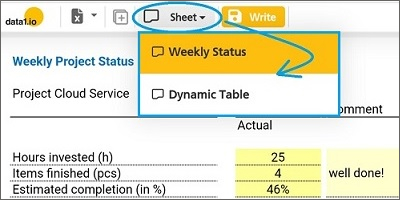
    Until now, planning and data entry was only possible on bottom level elements in the dimension tree (see sheet “Weekly Status” in GIF). From now on, you can enter data also in List Queries which are executed on a sum level element and list one ore more bottom level elements within the workbook. (see sheet “Project List” in GIF):

    This is enabled by the new writeback functionality in list queries and by a major optimization of alternative level queries. Try it yourself in our Public Showcase “Weekly Project Status”.

    Please be aware that at this stage it is not yet possible to enter data on the top level element itself and to splash the entered value to the underlying bottom elements.

    (2) Frontend: New Writeback Functionality in List Queries

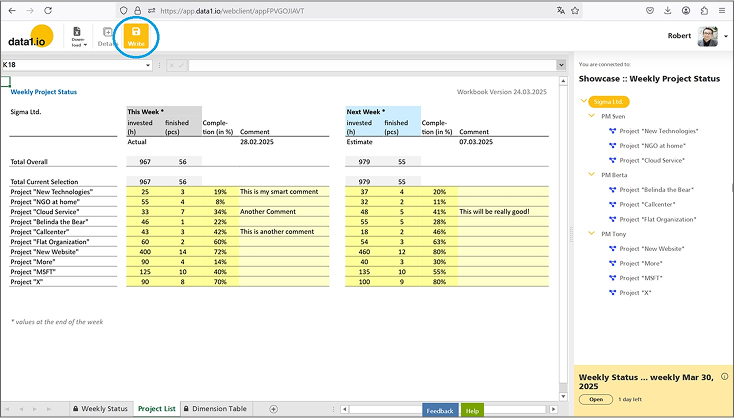
    With this release, it is possible to select a sum level element and directly enter data e.g. in a list query on the underlying bottom level elements.

    a. New Option for the “data1_Write_AlwaysOn” parameter

    By default, the Write button is disabled on sum level elements:

    In November 2024 Release we have introduced the new parameter “data1_Write_AlwaysOn“, with this release we added the new status “2”:

    • 0 = normal behaviour
    • 1 = write button will be enabled – only on bottom level elements
    • 2 = write button will be enabled – also on sum level elements

    With the new status “2” …

    … the Write button is enabled also on sum level elements:

    b. Changes for sum level messages, analyze write process and RLS

    Of course we have removed the previous message that data entries are not possible on sum level elements.

    Furthermore we have adopted the “Analyze write process” dialog (Ctrl + right click on dimension tree element) for the writeback of a bundle of elements:

    Last but not least we have also extended the RLS (Row Level Security) functionality in order to validate the RLS rules not only on bottom level elements but also on sum level elements.

    c. Take care of your “SYSTEM Delta” definition!

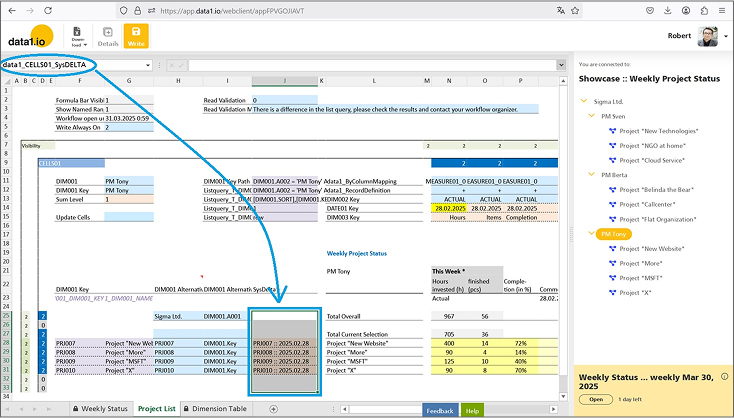
    The SYSTEM Delta parameter determines which records in the fact table will be replaced when the writeback of new data is executed. With the April 2024 Release we have introduced the new multi-cell “SYSTEM Delta” parameter, the understanding of this feature is essential for the successful usage of the new writeback for list queries.

    The SYSTEM Delta parameter must be defined as a multi-cell parameter – 1 string for every bottom element that is affected by the writeback:

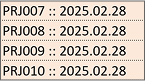
    Please be aware that all existing records in the fact table with one of those 4 SYSTEM Delta strings will be deleted when the Writeback is executed:

    Therefore you have to make sure that the SYSTEM Delta structure in your fact table fits to your data entry sheet!

    (3) Frontend: Major Optimizations for “DIM001 Alternative” Queries

    We have introduced the “DIM001 Alternative” parameter in October 2023 Release and have improved them in the January 2025 Release. With this release we deliver several major optimizations which makes it finally convenient to use list queries planning and data entry sheets.

    • Major performance increase by factor 2x to 4x for the READ process
      This was achieved by a major optimization of the number of the generated SQL queries in the backend.
    • Optimization of Always Encrypted
      There were also issues with the AE feature on the SQL database which could be solved.
    • Shorten the parameter name
      “data1_CELLS0x_DIM001_Alternative_Read_Attribute” to
      “data1_CELLS0x_DIM001_Alternative_Attribute”.

    Remember, the “DIM001 Alternative” ist defined with 2 parameters:

    • data1_CELLS0x_DIM001_Alternative
    • data1_CELLS0x_DIM001_Alternative_Attribute

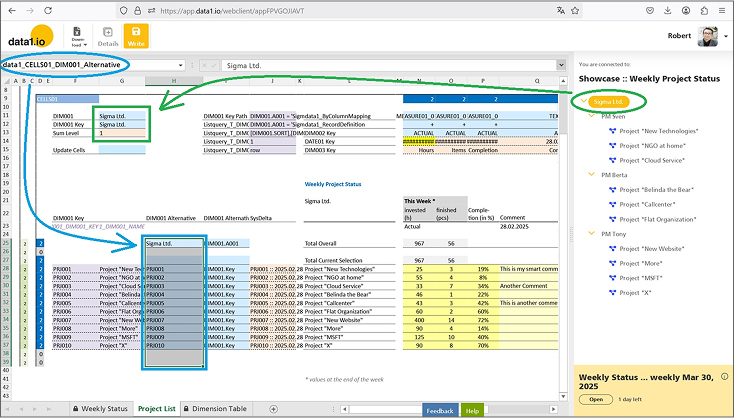
    The “data1_CELLS0x_DIM001_Alternative” parameter (= blue) replaces the selected element from the dimension tree (= green) with an alternative list of DIM001 elements (which are queried dynamically by a list query):

    The companion parameter “data1_CELLS0x_DIM001_Alternative_Attribute” defines, which Attributes from the dimension tree have to be used for the query of the value:

    (4) Admin Center: Manage Capacities

    We are happy that you can adjust the database capacities of your application / your tenant now with a new self-service screen. With this new tool you can increase your capacities e.g. for a few days if necessary and you can reduce your capacities if your workflow is finished.

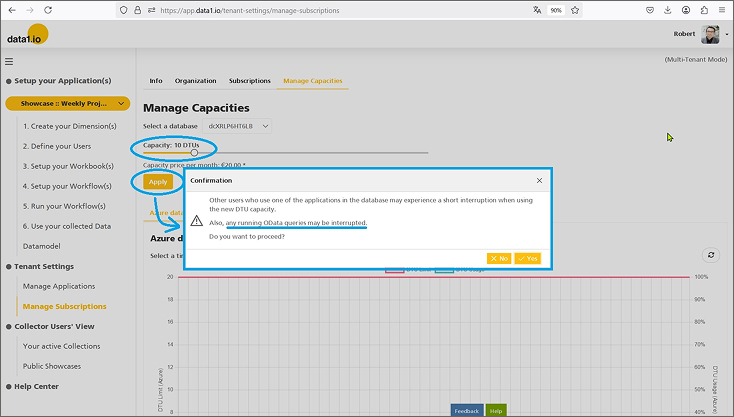
    Simply navigate to the new “Manage Capacities” menu item …

    … and change your database capacities with the capacities sliders and press the “Apply” button:

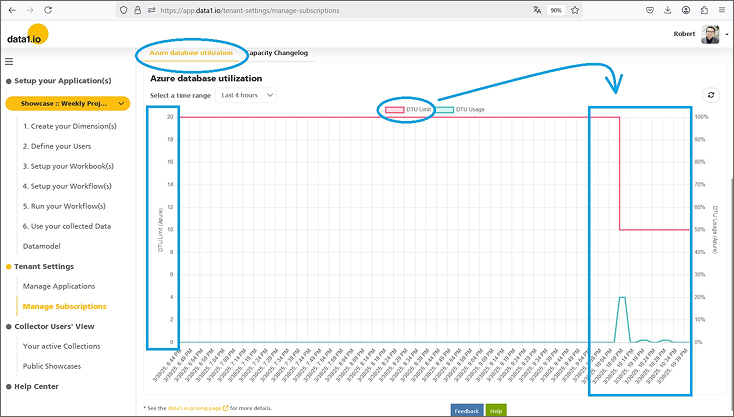
    This change takes a few minutes to be processed. In the “Azure database utilization” chart you can check, if your adjustment really works:

    (5) Frontend: Dimension Tree Reload

    Until now, switching between sheets triggered always a dimension tree reload even if the selected sheet uses the same tree.

    Furthermore, switching to sheets that are not connected to the data1.io application triggered a reload of the dimension tree. Since this is not necessary, we have changed that:

    Furthermore, an empty dimension table led to an endless initial loading process. This will not happen any more, you as a user get a proper message and the loading process will stop.

    (6) Further Improvements

    In the Frontend we have added a feature to execute the visibility settings for rows and columns also on synced sheets. Furthermore we have solved an issue with ListQueries on the “DimType_UID” Attribute (with the parameter data1_LISTQUERY01_T_DIM001_DIMTYPE_UID). And we restored the search box for the dimension tree which was lost for a short time.

    In the Admin Center there were two issues with the refresh of the current page content either after selecting another application in the dropdown or after choosing another entry from the dimension table dropdown. We removed a little bug with the color and icon settings for element types in the dimension tree and another bug when deleting a whole table. Last but not least we solved a resolution bug for the filter box dropdown within the table object.


    We hope you like the new features – we are very curious about your feedback!

    Please let us know what you think about data1.io and what kind of planning and data collection processes you evaluate to automate.

    we #StandWithUkraine

    Release February 2025

    We are happy to deliver the brandnew February 2025 Release with the new Workflow Landing Page and many more! Try it now!

    Remember, the Frontend is the user friendly spreadsheet for your Collector Users to deliver their monthly/weekly/daily data. The Admin Center is the tool for the Power User to setup and control your organization’s collection workflows.

    (1) Frontend: New Workflow Landing Page

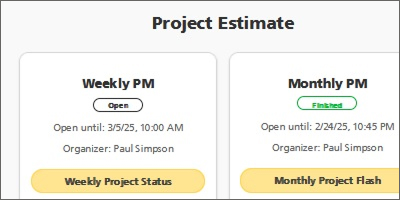
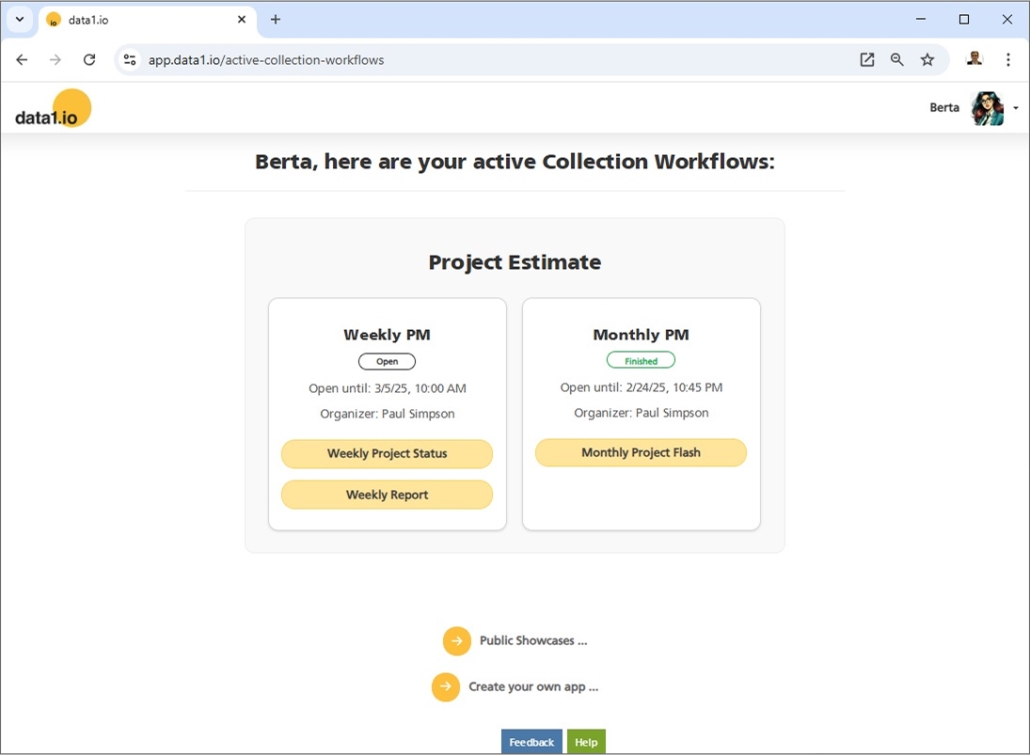
    Last month we have started to improve the workflow landing page for the collector users with the new workflow grouping. This month we have completed this mission and have streamlined the whole landing page:

    • Application(s) = grey box(es)
    • Workflow(s) = white tile(s)
    • Workbook(s) = orange button(s)

    Remember, until now this landing page was less logically structured and every workbook created a tile which took a lot of space and became confusing with a rising number of workflows and/or workbooks:

    (2) Frontend: New Workflow Info

    We have also added an “i” symbol on the yellow workflow box in the right bottom corner of the frontend and we have redesigned the workflow info dialog with more information than before:

    (3) Frontend: New Read Validation

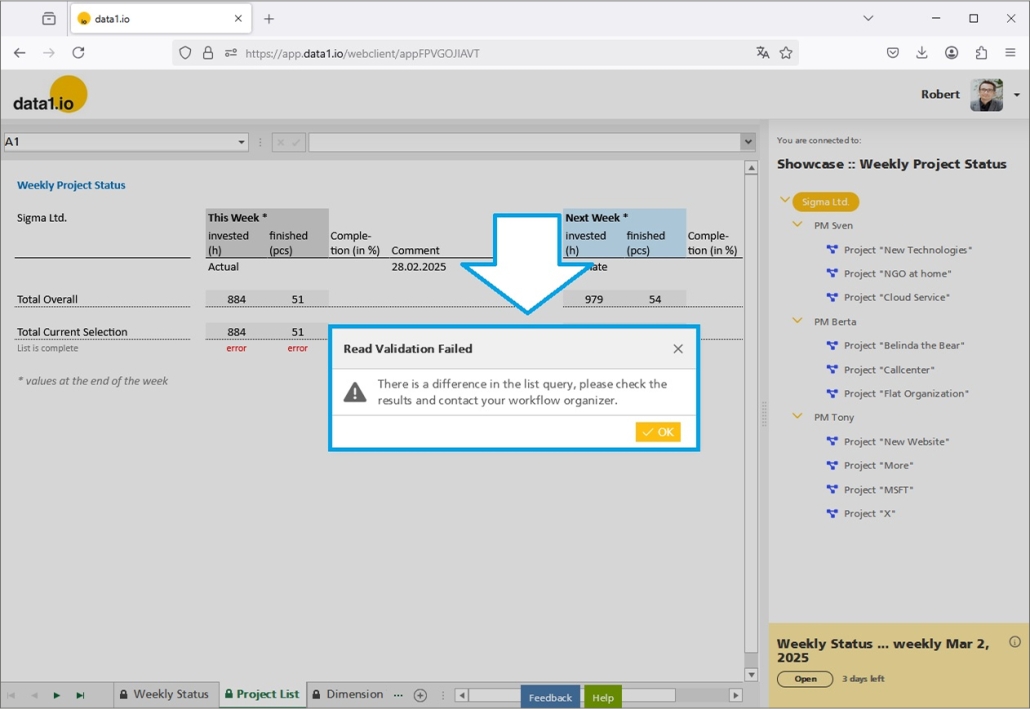
    We have added a new “Read Validation” to the workbook, additionally to the existing “Write Validation”. The read validation is executed immediately after the READ process while the write validation is executed immediately before the WRITE process.

    The new read validation is useful e.g. for the check of the sum of a list with the overall check value. This will save you from manually checking all single proofs in your report. This is how the new read validation looks like if the condition is not fulfilled:

    The new read validation is defined with the following parameters:

    • data1_Read_Validation
      0 = default = read values ok
      1 = Validation Message will be shown
    • data1_Read_ValidationMessage
      define the text which is shown in the message box
    • Multi Messages with the exension of _1, _2 etc.

    (4) Frontend: New Action Buttons for XLSX Download

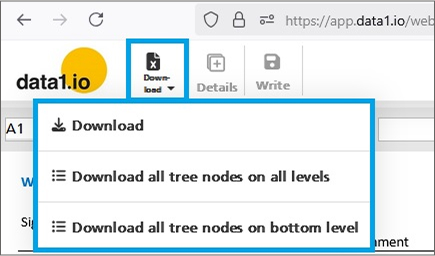
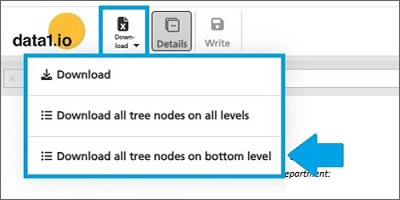
    Last month we improved the XLSX download and added the new “Download all tree nodes on bottom level” option:

    With this release, it is now possible to

    • new action
      “Download”
    • new action parameters
      “0” = Download current node
      “1” = Download all tree nodes on all levels
      “2” = Download all tree nodes on bottom level

    (5) Frontend: New Named Ranges for Listqueries

    We have streamlined the named ranges for the definition of Listqueries:

    • old -> data1_CELLS01_DimensionValues_xxx
    • new -> data1_LISTQUERY01_xxx

    Remember, listqueries generate dynamic lists of elements and/or nodes from the dimension tree within the workbook:

    See here the definition of a list query as a set of several parameters:

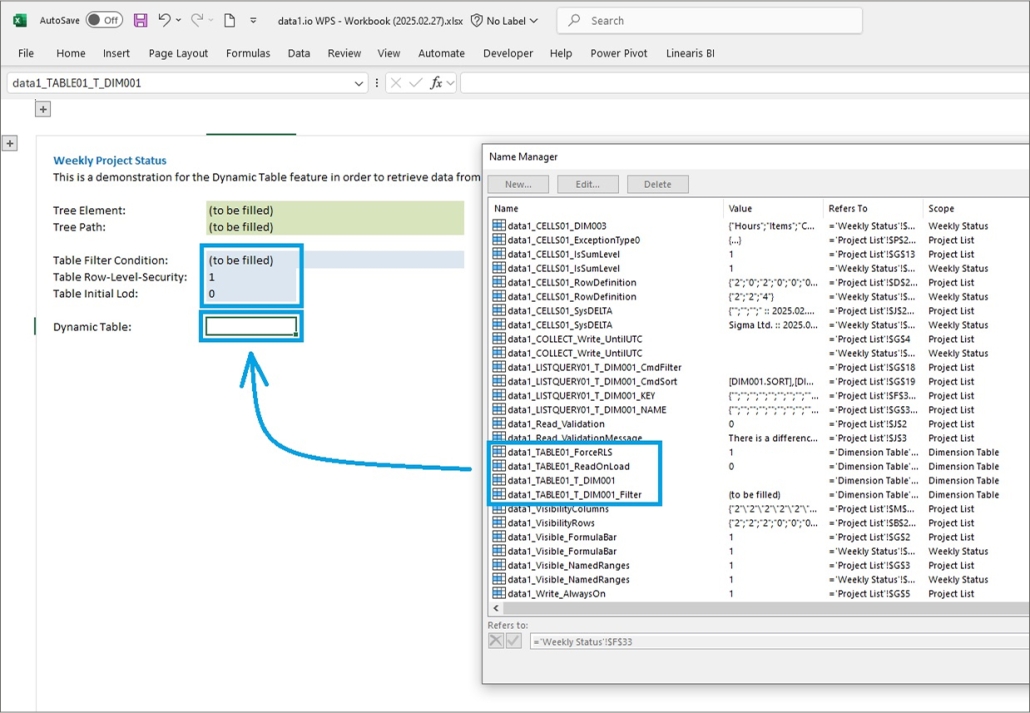
    (6) Frontend: New Named Ranges for Dynamic Tables

    We have streamlined the named ranges for the definition of dynamic tables:

    • old -> data1_CELLS01_InsertTable_xxx
    • new -> data1_TABLE01_xxx

    Remember, dynamic tables generate a table with the data from one of the dimension tables from your data model:

    See here the definition of a dynamic table as a set of several parameters:

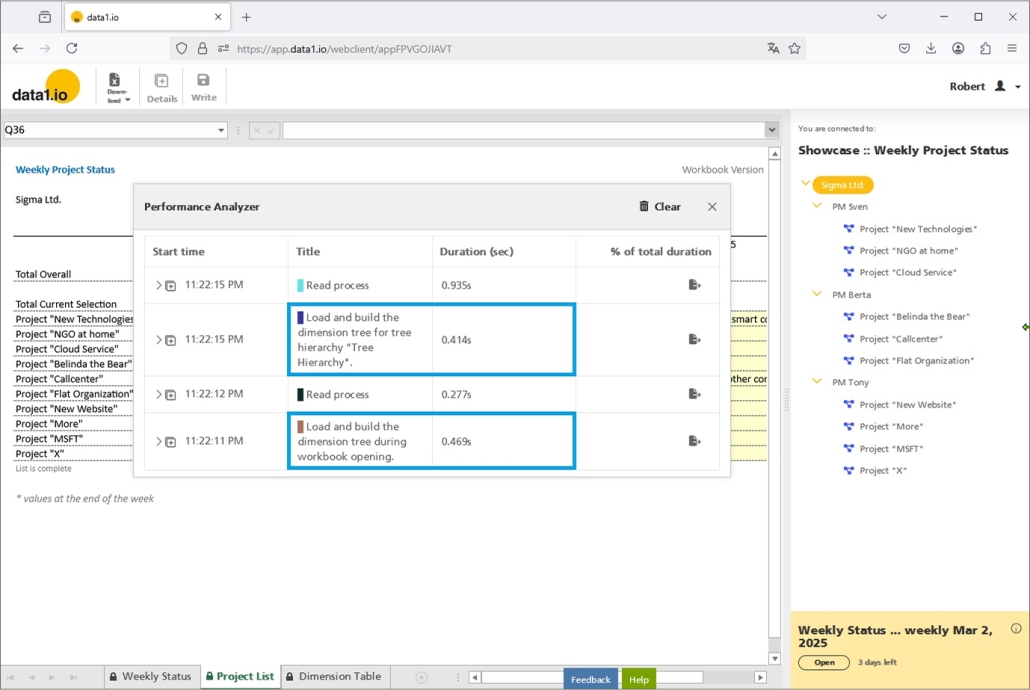
    (7) Frontend: Improved Loading Bar & New Entry in Performance Analyzer

    We have improved the display of the 2 loading bars in the frontend which are now fully synchronized with the real loading processes in the Frontend:

    • Loading bar for the dimension tree
      Executed on the initial loading and when switching between sheets
    • Loading bar for the workbook
      Executed on the initial loading and with every element selection in the dimension tree

    With this improvements, it is easier for you as a power user to observe the 2 influencing factors for the loading performance:

    Furthermore, we have added a new entry type “Load and build the dimension tree …” in the Performance Analyzer which is a very important amendment in order to analyze the real loading performance:

    (8) Further Improvements

    There was an issue with the data1_CELLS01_IsSumLevel parameter which was set automatically to “1” during the initial loading and led to a bumpy display of hidden/visible rows and columns.

    There was another issue with the Action buttons which disappeared under some circumstances.

    We have changed the loading behaviour for listqueries when the parameter data1_LISTQUERY01_T_DIM001_CmdFilter is set to “”. Until now this led to an output list with all elements, from now on this will led to an empty list.

    Furthermore we have improved the READ process with recomposed indizes on the fact table.


    We hope you like the new features – we are very curious about your feedback!

    Please let us know what you think about data1.io and what kind of planning and data collection processes you evaluate to automate.

    we #StandWithUkraine

    Release January 2025

    We are happy to be back after the christmas break with the brandnew January 2025 Release with the new XLSX download features and many more! Try it now!

    Remember, the Web Client is the user friendly spreadsheet for your Collector Users to deliver their monthly/weekly/daily data. The Web App is the tool for the Power User to setup and control your organization’s collection workflows.

    (1) Web Client: Improvements for XLSX download

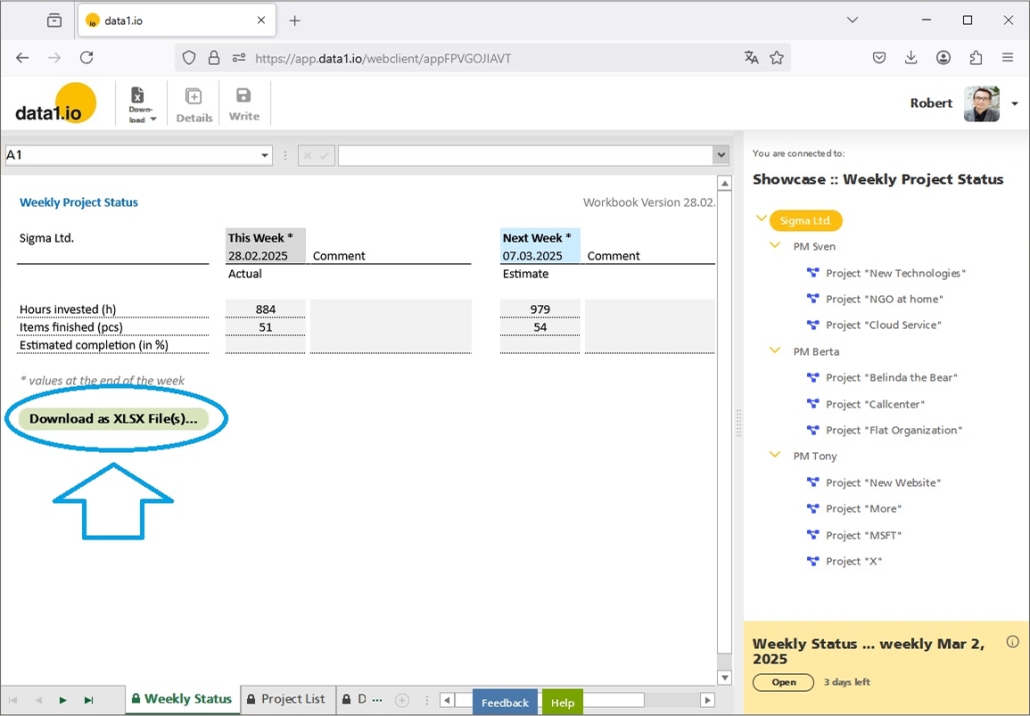
    Firstly, we have added a new option for the XLSX Download – the “Download of all tree nodes on bottom level“:

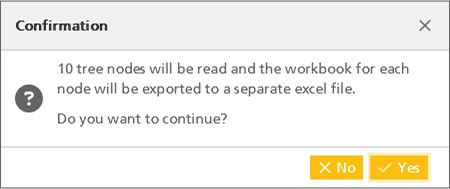
    This means, that the workbook sheet will be iterated through all (visible) bottom elements of the dimension tree and each node will be exported to a separate XLSX download file:

    Compared with the existing download option “Download all tree nodes on all levels“:

    Secondly, we have streamlined the names of the download files:

    • Application name
    • Element Path name

    (2) Web Client: Improvements for Action Buttons

    We have introduced the Action Buttons last year in March 2024 release and improved this feature in many subsequent releases.

    With this release, firstly we have added two new formatting options for the size and the alignment of the buttons`s title text:

    This is done with two new parameters for the JSON definition of the button:

    • “Font Size In px”: “12px”
    • “Text Alignment”: “Left” / “Center” / “Right”

    Secondly, action buttons also work now with frozen headers which was not supported until now:

    (3) Web Client: Group tiles by workflow

    We have learned that some of our customers use many workbooks which are organized in workflows. Until now, every workbook / workflow combination generated a tile in the “Your active Collection Workflows” landing page for the collector users.

    With this release we are happy to introduce the new grouping for the tiles by workflow… now it is easy to see, which workbooks belong to the same workflow:

    Furthermore we have optimized the vertical padding between the tiles not dependant any more on the screen resolution.

    (4) Web Client: Improvements for Alternative Level Queries

    Alternative Level Queries are a very important feature in order to implement advanced planning solutions in data1.io. Briefly summarised, with Alternative Level Queries you can query values from tree elements different other than the currently selected one.

    We have implemented tht following improvements:

    • Alternative Level Queries are executed now after Listqueries (this had the consequence that the tree element had to be clicked twice in order to get the full values)
    • Alternative Level Queries do not take into account the tree hierarchy any more (this had the consequence that queries e.g. on the top level element did deliver different values of the hierarchy nodes instead of always the same value)
    • Alternative Level Queries interact now also with ExceptionType definitions

    (5) Web App: Improvements for the new Table Object

    In the November 2024 release we have introduced the new Table Object in the data1.io backend.

    With this release we have improved the following features:

    • Empty cells in a column can be selected with the new “(Blanks)” entry
    • Tables with a column name ending with “SORT” are sorted by this column (we had this feature already in former times but it was lost …)
    • Columns width is optimized

    (6) Further Improvements

    We have solved an issue with DATA RANGE queries in combination with ALL Level queries (“%”) … the dates from the data range were converted to a datatime in your timezone which could lead to different results.

    We have improved the Workflow Pause mode (which was introduced in October 2024 Release) with a info dialog when activating and better visible info boxes in the web client for your collector users.

    Tables with a filter dropdown showed the total number of records of this table (without the filter of the dropdown) … this was confusing and we changed that:

    In the Table Object, the column “Is From Upload” was not set to “True” when data was uploaded.

    When uploading data from Excel into a table in the Backend and an error occured, then the mentioned row number in the Excel file was not correct. And there was also an issue with the progress bar which did not disappear after the upload was finished.

    There was an issue with the ODATA API and the new Always Encrypted feature on dimension keys.


    We hope you like the new features – we are very curious about your feedback!

    Please let us know what you think about data1.io and what kind of planning and data collection processes you evaluate to automate.

    we #StandWithUkraine

    Release November 2024 (before christmas break)

    We are happy to deliver the brandnew November 2024 release with major improvements on the table webpart and many more! Try it now!

    Remember, the Web Client is the user friendly spreadsheet for your Collector Users to deliver their monthly/weekly/daily data. The Web App is the tool for the Power User to setup and control your organization’s collection workflows.

    (1) Web App: Improvements for the table webpart

    With this release, our focus is on improving the table webpart of the data1.io backend (“Web App”). This webpart is used in most of the menu items in the backend.

    a) New Table Layout

    The table webpart has been improved in the following areas:

    • New light grey header
    • Grid layout using light grey horicontal and vertical lines
    • Reduction of line height by about 50 %
    • 20 records as default setting

    Compare the new layout …

    … with the previous layout:

    b) New Column Filter Experience

    We have replaced the previous column filter with a modern filter experience:

    • Select the elements from a list of distinct values of this column
    • Sort ascending / descending
    • Clear Filter function
    • Customized Filter … function

    Compare the new filter experience …

    … with the previous filter dialog:

    Of course it is also possible to define customized filters …

    … with this popup dialog:

    c) Single Record View vs. Table View

    We removed the “single record view” from most menu items …

    … and simply show single records in the normal table layout:

    (2) Web Client: New parameter “data1_Write_AlwaysOn”

    You can use this parameter to force the availability of the write button although otherwise the button would be deactivated. E.g. due to the presence of exclusively read-only cells, the presence of exclusively level queries, and so on. This parameter can have two values:

    0 = normal behaviour

    1 = write button will be forced

    Please be aware that the write button is forced only on bottom level elements and within the valid period of the current workflow.

    (3) API: New “Swagger” based REST-API

    Additionally to our existing ODATA API, we deliver now the new Swagger based REST-API: https://data1-service.azurewebsites.net/swagger/ui/index

    This Swagger based REST-API is easier to use than the more technical ODATA API and is relevant for the creation of “Azure Logic Apps”.

    (4) API: New Blogpost “Automatize data1.io with Azure Logic Apps” (in german language)

    Toni Kerschbaummayr, the core developer of data1.io, has written a fantastic blog post on how to use the “Azure Logic Apps” technology to automatize the data loading process in data1.io.

    Get an impression of the solution that automatically loads an Excel based dimension table after every change into your data1.io application:

    If you need help in setting up your own automation with Azure Logic Apps then do not hesitate to contact us!


    We hope you like the new features – we are very curious about your feedback!

    Please let us know what you think about data1.io and what kind of planning and data collection processes you evaluate to automate.

    We`ll be back after christmas break with the January Release!

    we #StandWithUkraine

    Release October 2024

    We are happy to deliver the brandnew October 2024 release with the new Workflow Maintenance Mode and many more! Try it now!

    Remember, the Web Client is the user friendly spreadsheet for your Collector Users to deliver their monthly/weekly/daily data. The Web App is the tool for the Power User to setup and control your organization’s collection workflows.

    (1) Web Client: New Workflow Pause Mode

    With the new “Pause Mode” you can pause a running workflow and this way stop a data collection process immediately. Your End Users (“Collector Users”) will not be able to write back new data any more.Use the pause mode if an emergancy case happens during a running data collection workflow.

    a) Pause Mode for End Users (“Collector Users”)

    Your Collector Users can enter a running workflow (status “Open”), entering data and write it back.

    As soon as the workflow will be paused by the Organizer, it is not possible to write back data any more:

    Collector users who enter the workflow after the pause was activated by the Organizer, will see this status “Paused” already on the workflow tile:

    The workbook can be entered, but not read or write process can be executed in pause mode:

    b) Pause Mode for the Power User (“Organizer”)

    The organizer of the workflow can pause a running workflow by simply activating the slider for the pause mode. Furthermore the organizer can define the message that is shown to the collector users:

    A paused workflow is title with the status “Paused” in the workflow overview:

    (2) Web Client: New Realtime Workflow Validation

    Until now, during a running data collection session of a collector users the status of the underlying workflow was not refreshed (the status at the beginning of the session was used during the whole session.

    With the new Pause function we have changed that. At every Write and Read process the status of the workflow is validated before the process itself is executed. As soon as the status of the workflow has changed, no Write or Read process can be executed anymore.

    The same is true if the Organizer of the workflow changes the deadline for the workflow. If the deadline is moved back by the Organizer, the collector users cannot write data any more:

    (3) Web Client: New E-Mail Confirmation for new users

    Until now, the e-mail adress of newly registered users had not to be confirmed. With this release, this has changed.

    If a new user is registered with data1.io …

    … the e-mail adress must be confirmed:

    It is not possible for a newly registered user to login with data1.io as long the e-mail adress is not confirmed:

    The registered user must open the confirmation e-mail and click the link in the e-mail:

    You are directed to the e-mail confirmation page, where you can find also the link to the data1.io login page:

    (4) Web Client: New Performance Analyzer Export / Import

    We have created a new function in the Performance Analyzer (invoked with “Ctrl + Alt + P”) …

    … which exports the content of the performance log into a file (*.data1iopa):

    This file can be submitted the our support (support@data1.io) and our Global Admins can import this file within their own environment in order to analyze the submitted performance log:

    (5) Web Client: Improved Copy & Paste Behaviour

    There was an issue with Copy & Paste of cell ranges on protected cells. Until now it was possible to paste a range of cells (e.g. values from Excel) into the workbook and paste it also over protected cells:

    This has changed now. It is not possible any more to paste a range of cells on protected cells:

    (6) Web Client: Improvements for Copy Data and Action Buttons

    We have done some improvements on the Copy Data feature. First, we have streamlined the Copy Data dialog. Second there was an issue with the calculation of the number of the copied records in applications with encrypted measure columns.

    Furthermore we have also improved the the action buttons. First, sometimes the buttons disappeared after scrolling and leaving / come back to the sheet. Second, there was an issue with the SetCellValue parameter which can be used to control the visibility settings for rows and columns.

    (7) Debugging

    As every month we have done also some debugging.


    We hope you like the new features – we are very curious about your feedback!

    Please let us know what you think about data1.io and what kind of planning and data collection processes you evaluate to automate.

    we #StandWithUkraine

    Release September 2024

    We are happy to deliver the brandnew September 2024 release with the new Mobile Views and many more! Try it now!

    Remember, the Web Client is the user friendly spreadsheet for your Collector Users to deliver their monthly/weekly/daily data. The Web App is the tool for the Power User to setup and control your organization’s collection workflows.

    (1) Web Client: Improved Mobile Views

    In April 2023 we delivered the first step of an improved mobile view and with this release we deliver the second step!

    a. Improved Mobile Portrait View

    In portrait view we have

    • added the button titles in the menu bar
    • added the on/off button for the dimension tree
    • replaced the Excel like sheet selection and the horicontal scroll bar by the new sheet selector
    • removed the Feedback/Help buttons at the bottom of the screen

    Tipping the on/off button for the dimension tree turns the dimension tree on or off:

    Tipping on the new sheet selector gives you a “drop up” list of the visible sheets within the workbook:

    b. Improved Mobile Landscape View

    In Landscape View we have

    • lowered the menue bar
    • added the on/off button for the dimension tree
    • focussed the content of the dimension tree – we have removed the application information at the top of the tree and we also have removed the workkflow block at the bottom of the tree
    • replaced the Excel like sheet selection and the horicontal scroll bar by the new sheet selector within the menue bar

    Tipping on the new sheet selector gives you a “drop down” list of the visible sheets within the workbook:

    c. New Unfreeze Function

    Furthermore we have added an unfreeze button which appears if there are frozen rows and/or columns within the selected sheeet. Unfreezing will help your collector users using the sheet also on the mobile phone and on the tablet:

    (2) Web Client: New Copy Data functions (Add-On)

    The Copy Data function duplicates the existing records in the fact table of the selected element and alters e.g. the scenario. It can be used for the following tasks:

    • Freeze the current data status as „Forecast x“ or as a backup (Collector Users)
    • Create a new scenario from the current data status (Power Eser)
    • Create the default values for the upcoming Forecast out of the Budget or the last Forecast (Power User)

    This function is basically designed to be used by the Collector Users (= End Users), but it can also be configured to be used only by Power Users.

    The Copy Data feature was released in January 2024 and improved in February 2024 and June 2024. With this release another major update is delivered for this feature.
    a. New Definition Structure

    Until now, a target rule could only be defined together with one filter condition. This was a major restriction that we have removed now with this release. From now on, the target rules are defined independently from the filter conditions:

    b. New Target Rules

    Furthermore we have added two new major types of target rules: Date rules and Measure rules.

    With a Date rule the values of a date column in the duplicated fact records can be altered to another period of time. E.g. you can move the period of time by + 1 month:

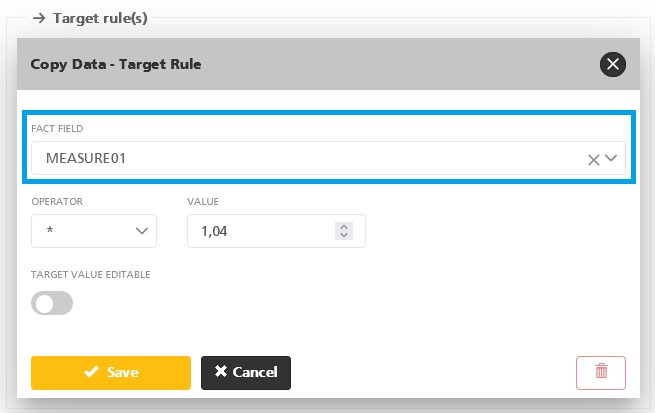
    With a Measure rule the values of a measure column in the duplicated fact records can be altered to another value. E.g. you can increase all values by + 4,00 %:

    (3) Web Client: New Aggregated % Queries on Date Keys

    Until now, aggregated queries within the date dimensions could only be executed with the YEAR, QUARTER and MONTH keywords:

    With this release you can use also the % asterisk for the date dimension in order to query the total of the whole period:

    (4) Web Client: Performance Improvement for Always Encrypted

    In July 2024 release we delivered the Always Encrypted feature for the dimension keys as the new standard. We are happy that we also could improve the performance of the “old” encryption of the measure fields by using a group by index which enables buffering and batch processing of the requested data.

    The performance gain is the largest in reports which aggregate (“group by”) the data in one or more dimensions and can be up to 400 %.

    (5) Showcase: Comments on aggregated account levels

    In May 2024 release we have introduced the new multiple layouts with the new CELLS01/CELLS02 definitions. With this release we deliver a demo for the collection of comments on an aggregated account level.

    Look at the EBIT Planning in our public showcase Integrated P&L Planning. The collection of comments was implemented on the bottom accont level (which can be done very easily in data1.io):

    With a separate CELLS02 definition the comments can be collected also on an aggregated account level (e.g. subtotal lines):

    (6) Improvements and Debugging

    As every month we have done a lot of smaller improvements and debugging.


    We hope you like the new features – we are very curious about your feedback!

    Please let us know what you think about data1.io and what kind of planning and data collection processes you evaluate to automate.

    we #StandWithUkraine